During our latest tests of Turbo VPN's Windows client, we identified active IP leaks and misconfigured protocols that put users' privacy at risk.
Owned by Singapore-based Innovative Connecting Pte. Limited, Turbo VPN boasts over 500 million downloads on Android .
Although the provider issued a patch after receiving our initial technical findings earlier this week, version 3.6.0.0 continued to leak IPv6 addresses across its proprietary protocols (Lepus and LinkSentinel) as well as standard OpenVPN connections.
Following further technical evidence provided by TechRadar, Turbo VPN has deployed a second update (version 3.7.0.0) for Windows to patch the persistent IPv6 leaks. Our testing confirms that this latest build now successfully blocks unencrypted IPv6 traffic.
However, information regarding the app's proprietary protocols remains scarce, and one protocol (V2Ray) was quietly removed during the recent updates. When asked about its removal, the company told TechRadar it is "still checking" the protocol.
Intermittent IP leaks
Concealing your IP address is a VPN's primary objective. However, when we began testing Turbo VPN's proprietary protocols earlier this week on an IPv4-only connection, we found that our real IP address wasn't being hidden at all.
Despite the app displaying that we were "connected," every online IP lookup test we ran showed our real IPv4 address. We rebooted our machine, reinstalled the app, and used multiple independent lookup tools, but the issues persisted.
Screenshot showing IPv4 leaks with Turbo VPN connected during our initial tests on version 3.5.2.0 (Image credit: Future)
To confirm our findings, we installed the app on a second machine on a separate dual-stack IPv4/IPv6 network. Testing on this setup revealed a distinct failure: while our IPv4 address was masked, our genuine IPv6 address remained exposed.
Subsequent follow-up tests on our IPv4-only connection also saw IPv4 masking stabilize, which highlights the intermittent nature of the initial build.
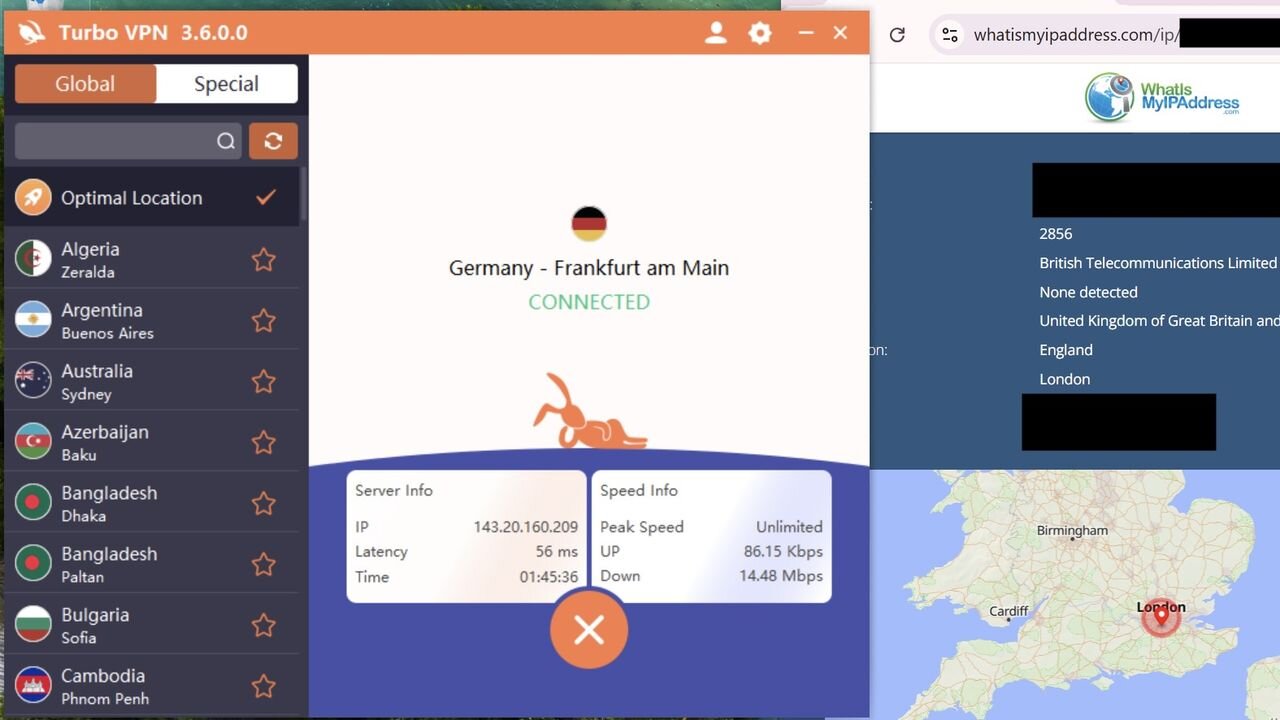
After we shared these technical findings with the team, Turbo VPN issued an update (version 3.6.0.0). In our testing of this build, the app successfully masked IPv4 addresses consistently but IPv6 addresses remained exposed on proprietary protocols and standard OpenVPN connections.
Given that most modern operating systems and web browsers favor IPv6 connections over IPv4, failing to tunnel or block this traffic left users on dual-stack connections exposed by default.
Following a subsequent update issued today, the Windows app is now blocking unencrypted IPv6 traffic while masking IPv4 addresses consistently.
Screenshot showing IPv6 leaks on Turbo VPN version 3.6.0.0 (Image credit: Future)
Lepus: a VPN or Shadowsocks proxy?
Lepus is listed alongside Turbo VPN's standard VPN protocols. It is described as providing "excellent camouflage with equally outstanding speed and stability built for highly restricted networks."
However, during our initial tests Lepus operated in ways distinct from standard VPN protocols. Rather than creating a system-wide encrypted tunnel, it executed a local ShadowsocksR (ssr.exe) process that toggles Windows settings (ProxyEnable: 1) to run a local proxy on port 46288.
That means any non-browser data sent from your device — including background OS traffic, desktop messaging apps, and command-line utilities — did not benefit from an encrypted tunnel and was instead routed over a standard connection.
We asked the team at Turbo VPN how long this behavior may have been present for, but they did not reply to that specific question.
In our subsequent tests, version 3.6.0.0 successfully protected all outbound traffic in an encrypted tunnel and successfully operated as a system-wide tunnel for IPv4 traffic.
However, its configuration still allowed for IPv6 leaks, which means users on a dual-stack connection were left exposed. This is because the app did not enable any IPv6 virtual interfaces, assigned zero IPv6 gateway routes, and set no firewall rules to block outbound IPv6 traffic as shown below.
Screenshot showing IPv4 and IPv6 route table while connected to Turbo VPN's Lepus protocol on version 3.6.0.0. (Image credit: Future)
The official response, and what comes next
After sharing multiple rounds of technical feedback with Turbo VPN, the Windows app (version 3.7.0.0) appears to have fixed the remaining IPv6 leak issues.
Rather than attempting to create a full IPv6 infrastructure, the latest version appears to have implemented IPv6 blocking at the client level. This forces all web traffic down the encrypted IPv4 tunnel.
However, detailed information about the proprietary protocols remains conspicuously absent both within the app and on Turbo VPN's website — a search of the company's official website yields no results for Lepus or LinkSentinel.
Beyond a brief descriptor on the protocol-selection tab, users are given no technical context about how these protocols route traffic or what security mechanisms they employ. Combined with the silent removal of V2Ray, users are left with little information on how best to secure their connection.
The company did not respond to questions about the lack of information regarding the app's proprietary protocols. In response to our initial findings, the company said: "The behavior observed in the Windows client arose only under certain network configurations, appearing to occur in a limited number of network environments.
"Following the points you raised, our technical team carried out a thorough review and implemented the necessary improvements in the latest Windows build within a short timeframe."
We will continue to test the product and update our full review in the coming weeks.