This is one outlet's own report from TechRadar — the article as it was filed.
AIPROPX ReportTechRadar · 1h ago
Rebelle 8 review: This impressive painting software let me turn my MacBook into a full-blown canvas
Taking a photo and altering it, like you can do with Adobe Photoshop, is old hat these days, as so many apps allow you to do just that. But if you’re an artist who loves to paint, this type of software can’t replicate the feel of watercolours, oils, acrylics, and pastels as they’re applied onto a canvas.
Some developers saw this as a challenge: how to replicate painting on a canvas in the digital world. Escape Motions’ Rebelle is a serious competitor in this field, and have introduced a few new features with their latest 8th version. Let’s take a look at it.
One-off license at a cost that won’t break the bank
Free trial available
There’s a lot of good news for people who like to own - actually own - multi-platform software: first of, Rebelle is available for Windows and Mac users (sadly, Linux fans are all too often left out of the loop, as they are here).
Even better, there’s no option to rent the software: you purchase it with a one-time fee of $90. Which is quite reasonable for software of this caliber, especially since you’re allowed to install it on up to three computers.
There is a more advanced version, called Rebelle Pro for $150. Finally, Escape Motions offers a very generous 30-day trial so you can check out the software and see how it works for you.
You will have to create an account with them in order to access it, but all they ask is an email address - you keep your credit card details to yourself.
All in all, this feels like a very good start. Rebelle 8 available to buy from developer Escape Motions by clicking here .
Pricing & plans: 5 / 5
Rebelle 8: Interface
(Image credit: Escape Motions // Future)
A well-designed interface
Familiar enough to ease you in if you’re new to Rebelle
Different enough that there’s going to be a bit of a learning curve
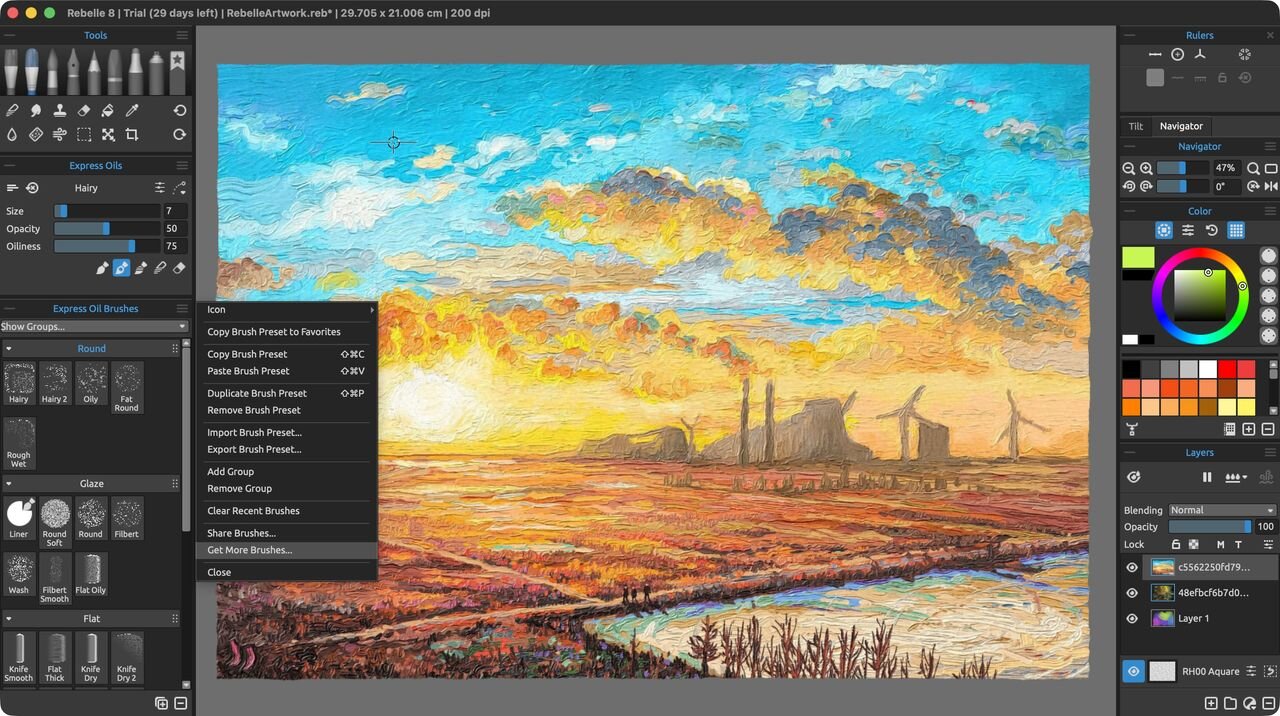
If this is your first foray into Rebelle, you’ll find the interface very similar to other image editing applications. You have two sidebars, one on either side. The left one focusses on your brushes, while on the right, you have your layers, color selections, and navigational options.
The rest of the screen real estate is devoted to your canvas, but that’s not all there is to it. Hop on over to the Menubar’s Window menu to see other tools, which are available by default as floating windows.
However the interface is highly flexible, enabling you to dock these windows into either sidebar, be it as their own unique dedicated area, or sharing the space with other tools - when that happens, a small series of tabs will appear above that shared section, allowing you to switch between them.
This allows you to create a unique setup to match what you need to see as you digitally paint your projects. You’re also able to export this layout to make it easy to set up Rebelle on another computer with your customized personalised setup.
Overall, the interface is similar enough to not feel intimidating, but different enough that it will take you a few minutes to understand where everything is, and what it does. But the main takeaway is that it’s well designed, and is easy enough to understand that it won’t take you long to get the gist of it.
Interface: 4 / 5
Rebelle 8: Tools
(Image credit: Escape Motions // Future)
So many brushes to play with, and so many parameters to explore
Lots of different types of canvases
Create truly unique projects… as long as you can handle some of the quirks
The tools available are pretty much all the various brushes you can work with - and there are so many. You start with selecting the type of brush from the top left section of the interface, like an acrylic brush, or one for watercolors, inks, pastels, etc.
Beneath that is another panel, with a handful of parameters to customize how the selected brush will paint on your chosen canvas, and you could easily leave it at that, but that would be ignoring the dozens of options further down the sidebar.
For instance, the Express Oil brushes have sub-categories, such as Round, Glaze, and Flat, and if that’s not enough, a drop down menu allows you to browse through and purchase additional ones.
The options and flexibilities are immense, and it can be a lot of fun to paint digitally in that way. You also have all the advantages of working on a computer, such as having multiple layers, cloning sections, erasing others, the lot.
There were a few things I was disappointed by, the biggest one being that I could only have one project open at a time. As someone who far too often has too many ideas on the go, this felt unnecessarily restrictive to me.
Another had to do with controlling the canvas itself. I work on a laptop and use a multi-touch trackpad for everything, but even with all the options I could find disabled, that canvas would move or suddenly zoom in or out at random moments.
Thankfully there’s a handy and simple keyboard shortcut to bring it all back to the centre, filling the screen, but it got really annoying by the end. I think the lesson here is don’t use the trackpad when doing serious artistic work with Rebelle.
Also, despite using a powerful computer to test this out (a laptop with an M5 chip), I felt like sometimes I had to wait a few seconds for the software to render the stroke I made. This app needs a lot of power.
Tools: 4 / 5
Rebelle 8: What's new?
(Image credit: Escape Motions // Future)
No revolutionary ‘wow’ additions
Relatively small improvements makes creative life much easier
Version 8 brings a few refinements to this software package - nothing earth shattering, but they’re welcome additions nonetheless. Here are some I felt were important to mention.
The Canvas Panel has been streamlined, making it easy to select a new type of paper and see all those you don’t yet have, but are available for purchase - you can even test this new canvas prior to acquiring it (if this constant advertisement is not ...
AIPROPX is an independent multi-source news index — we track, compare, and connect coverage from across the web into one place you won't find anywhere else.