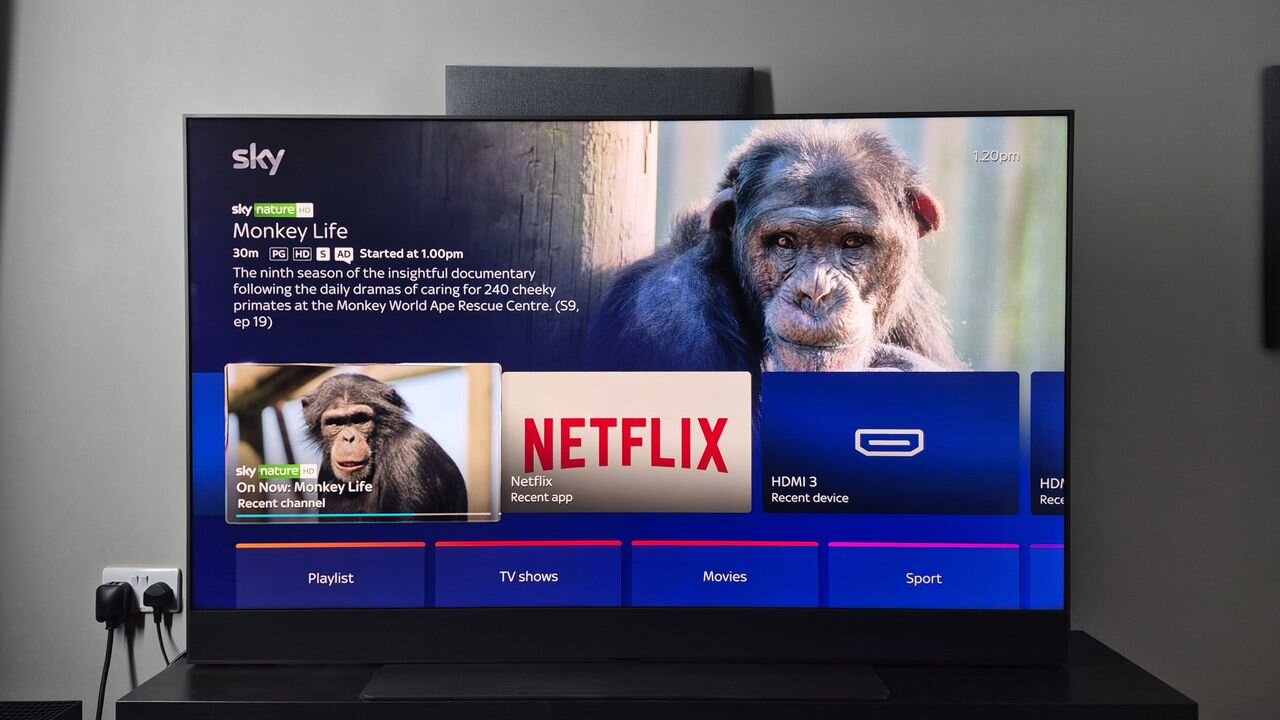
I’ve had the Sky Glass Gen 2 TV setup in my living room since April of last year. To begin with, I wasn’t quite sure whether I was going to get on with Sky’s flagship TV. It was quite different from a lot of TVs in its price range, boasting a relatively chunky build, a unique OS, and I'd be swapping my trusty soundbar for its built-in Dolby Atmos sound system.
For the uninitiated, Sky Glass models provide a captivating proposition for Sky customers. It acts as an all-in-one TV hub, with access to live channels over your network connection (rather than a satellite or aerial), various streaming and smart apps, and more.
So would I recommend buying the Sky Glass Gen 2 instead of one of the best OLED TVs or best mini LED TVs in its price range? I’ll take you through my experience as a user, break down its picture and audio performance, and tell you whether I think it's truly worth the asking price.
The user experience: how does the Sky Glass Gen 2 stack up after a year?
(Image credit: Future)
Let’s start by talking about the user experience you get with the Sky Glass Gen 2.
As I said, it aims to serve as an all-in-one hub for Sky customers, and in my view, it pulls this off with ease. The user interface is laid out in a simple and practical way, making it seamless to scroll through each channel, access a comprehensive TV guide, tap into apps like Netflix and HBO Max, and switch between various sources.
The crowning achievement of the Sky Glass Gen 2’s experience, though, is its voice control. I’m not usually a big fan of these — I’ve never really got on with Alexa for controlling devices, or Bixby on Samsung phones, for instance.
But Sky nails it on its Glass TVs. You can either say ‘hello Sky’ or press the mic button on the remote control, and ask for specific apps or channels, or even issue a more general command such as ‘show me movies with cats’. I always find that I get accurate, helpful results, and I rarely experience accidental triggers of voice controls or irrelevant answers.
The interface also looks really clean, and accessing settings is quick and seamless. Just press the ‘…’ button, and you can swiftly alter picture mode, sound settings, toggle speech enhancement, and more.
More generally, I just find Sky's OS to be a lot more user-friendly than a lot of its rivals, such as VIDAA OS on my Hisense TV or even Google TV on TCL models I've tested. Sky's OS just feels sleeker, more organised, and its pin-point voice controls make everyday viewing feel much more seamless.
Other than the occasional plug for a Sky exclusive, there's also little in the way of ads — something the aforementioned rivals push onto the home screen more than I'd like.
Did you know TechRadar now has membership?
(Image credit: Future)
Become a TechRadar Insider by simply clicking 'Join Now' at the top of this page. Have a question? Please email [email protected]
One issue I’d previously had was that advanced settings were buried deep within the main menu, but Sky has updated this, making them accessible via the ‘…’ button as well. This means I can easily change network settings, alter viewing preferences, and make advanced picture adjustments (such as changing Dolby Vision or HDR picture modes).
I’ve also found that having TV channels available through my home network is a big plus. The quality of broadcasts is excellent (more on that later), and I’ve experienced very few network issues during my time with the TV — you need 25Mbps download speeds to get 4K streaming, which is no problem in a city. But if you ever do encounter issues, there’s an option to fall back on an aerial connection, which is always handy.
This isn’t to say I’ve experienced no hiccups whatsoever. On occasion, some channels have failed to load, and apps haven’t displayed on the main menu. But this has been a very rare thing, and has always been fixable by unplugging the TV to restart it.
Something else that I love about the Sky Glass Gen 2, is that you get bundled subscriptions to select streaming apps, such as Netflix, HBO Max, Disney+, and Hayu — so long as you have a Sky Ultimate TV subscription, which is £24 per month.
That’s an exceptional deal, and has opened up a lot of shows and movies that I’d previously missed out on. Sure, it's the standard (with ads) subscription for these services, but as someone who typically buys 4K Blu-ray if I want the best viewing experiences for things I really cherish, that’s fine by me for everything else.
Finally, I have to say that the Sky Glass Gen 2 is extremely easy to set up and get started with. It comes with plastic feet that slot into the TV without needing to mess around with screws or fiddly stands.
Picture & audio quality: a solid all-round performer
(Image credit: Future)
Right, so the user experience is great on the Sky Glass Gen 2, but how does it perform when it comes to picture and audio?
First things first, it's important to understand the tech inside this model. It's a QLED TV that harnesses the power of local dimming to create a vibrant picture with solid black levels to match. The Glass Gen 2 added more dimming zones, greatly boosts brightness, and provides wider viewing angles than its predecessor, and the results are pretty good overall.
Are you going to get the inky blacks and eye-popping colors that a TV like the LG B6 can deliver? No, but as a QLED model, the Sky Glass Gen 2 still really impressed me, and it's brighter than LG's model, making it good for well-lit living rooms.
I'd consider its picture to be competitive against similarly priced mini-LED options from the likes of Hisense and TCL most of the year around — though in the sales or on Black Friday, you might be able to get a more premium TV from those models for a similar price, which might edge the Glass 2 out.
The Glass Gen 2 supplies good contrast and color accuracy, decent black levels, and impressive motion-handling, making it a versatile option for all kinds of content. Whether...