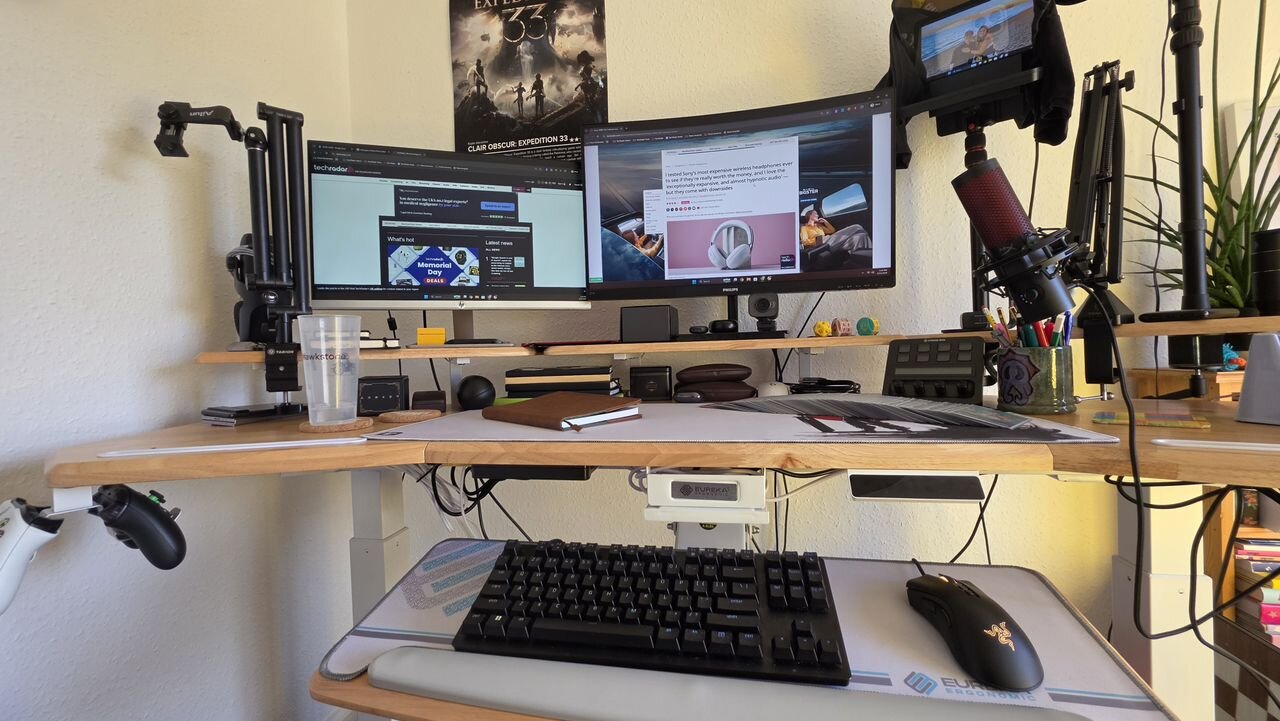
Standing desks boast a variety of comfort and long-term health benefits over sitting in your chair all day, and if you’re looking for one that won’t just serve as a simple desk but a command center for your setup — be it for working from home, content creation, or gaming, or a mixture of all three — you’ll love the Eureka Ergonomic Aero Pro, and it's one of the best standing desks we've tested.
I’ve been testing it for the past couple of months, and this frankly giant station has all the space you could need. My previous gaming desk always felt too cramped, whereas now I have more freedom than I know what to do with. To this end, while the Aero Pro is just fine as a desk only one person will use, it feels especially good for a shared space — I have enough room for all my gear, and whenever I’m not working from home, my partner has been able to easily set up her laptop to work without needing to shove my gear out the way.
Despite its size, this desk feels supremely stable, even at its max height. I’ve gone as far as to shake the desk a fair amount, and I never had any fear it would collapse and destroy my home setup.
Adjusting the desk’s height is as easy as pushing a button to control the electric motors, and with memory presets it’s no trouble at all to adjust the desk between your preferred settings.
My only gripes are that the lighting it boasts is a tad lackluster and that the price, while more than reasonable for what you get, pushes this desk firmly out of the affordable tier. The size is also something of a double-edged sword — the Aero Pro can consume a more compact room.
That said, if you're looking to pick up a standing desk that’s spacious enough for pretty much any setup, and will encourage you to not stay seated all day, then the Eureka Ergonomic Aero Pro is one to keep your eyes on.
(Image credit: Future / Hamish Hector)
Eureka Ergonomic Aero Pro: Price and Availability
Prices start at $619 (around £460 / AU$865)
Only available in the US, but does ship to the UK
Multiple sizes and material choices available
Premium gaming desks, especially standing desks, don’t come cheap, but the Eureka Ergonomic Aero Pro comes in at a decidedly mid-range price point despite its impressive size and useful features.
The more affordable 63"x23" size option will set you back $619 (around £460 / AU$865), while the larger 72"x23" model I’ve been testing starts at $799 (around £595 / AU$1,115) — with solid wood designs costing more than the MDF alternatives if you’re after something with a little extra style and durability.
The larger size doesn’t just boast more main desk space; it comes with a pull-out under-shelf for your keyboard and mouse, which offers added ergonomic comfort — otherwise both designs are identical in terms of their shape.
As for availability, Eureka Ergonomics primarily sells to the United States, though they do have retail partners in the UK and select European companies — unfortunately, they don’t sell their desks in Australia, so you’re out of luck there for the Aero Pro and the company’s other designs.
Value score: 4.5/5
Eureka Ergonomic Aero Pro: Specs
Eureka Ergonomic Aero Pro
Price
$799 (around £595 / AU$1,115)
Height
29.5-48in / 75-122cm
Load capacity
220lbs / 100kg
Material
Alloy Steel frame, wood top material
Dimensions (H x W x D)
29.5-48in x 72in x 30in / 75-122cm x 183cm x 76.2cm
(Image credit: Future / Hamish Hector)
Eureka Ergonomic Aero Pro: Design
Lots of usable space across multiple levels
Shelves for up to a three monitor setup
Lighting is a let down
The wing-shaped Aero Pro from Eureka Ergonomics feels at times less like a standing desk and more like a standing station — especially if you opt for the larger 72x23 inch model I’ve been testing. The huge size is more than you could ever need for gaming, working, or streaming, and the winged shape’s slight curve immerses you in your chosen setup (though it’s in an approachable way, rather than seeming like your desk might swallow you whole).
What compounds the sense of spaciousness this desk provides is that not only are you treated to a massive main desk space — which offers plenty of room for a laptop, a desktop music setup, your notebooks, or a playmat for an online TCG match — but you also have a trio of monitor shelves at your disposal.
These are ideal for, well, monitors but also your PC speakers, or something like a streaming setup. I have a dual-monitor setup across two, with my mic, prompter and light attached to the third shelf. On smaller desks this practical but busy setup has felt crowded, but with the Aero Pro I have it all set up neatly with plenty of room left over — my desk feels usable, not cluttered.
This spaciousness also means the desk can easily serve as a shared space. I don’t mean two people using it at once, but when I’ve not been working from home, my partner has found she can come and use this standing desk with no trouble; there’s all the room she could need to set up her laptop without needing to disassemble or move my gear. When I come home, I can just close the laptop lid and get back to using my PC.
Part of this lack of clutter is helped by the larger Aero Pro model’s other upgrade: its fourth shelf. This adjustable one slides out from underneath the desk and is ideal for your keyboard and mouse. I’ve found it helps me find the comfort sweet spot for my PC peripherals, and again keeps the main desk clutter-free.
(Image credit: Future / Hamish Hector)
Whichever size you choose, the Aero Pro comes with a couple of extra design features that range from just fine to very useful. Under the desk you’ll find a hanging controller station on the left which supports a pair of handsets, a cupholder on the right for which I have yet to find a cup/mug/glass that it isn’t an ideal size for, and a pair of brackets which are a massive help for cable management — I use them to support my monitor’s power cable bricks.
Speaking of, I appreciated the var...