
RESOLVING THE LEDGER
RESOLVING THE LEDGER
Only one outlet has reported this event so far — you're reading it below, credited to its source. AIPROPX is tracking the web for more coverage; as additional outlets confirm it, this becomes a full multi-source story automatically.
By AIPROPX Editorial Desk · Published · Updated
One outlet is reporting this so far. AIPROPX is tracking it and will gather every additional source as it develops — the full multi-source comparison appears automatically once a second outlet confirms it.
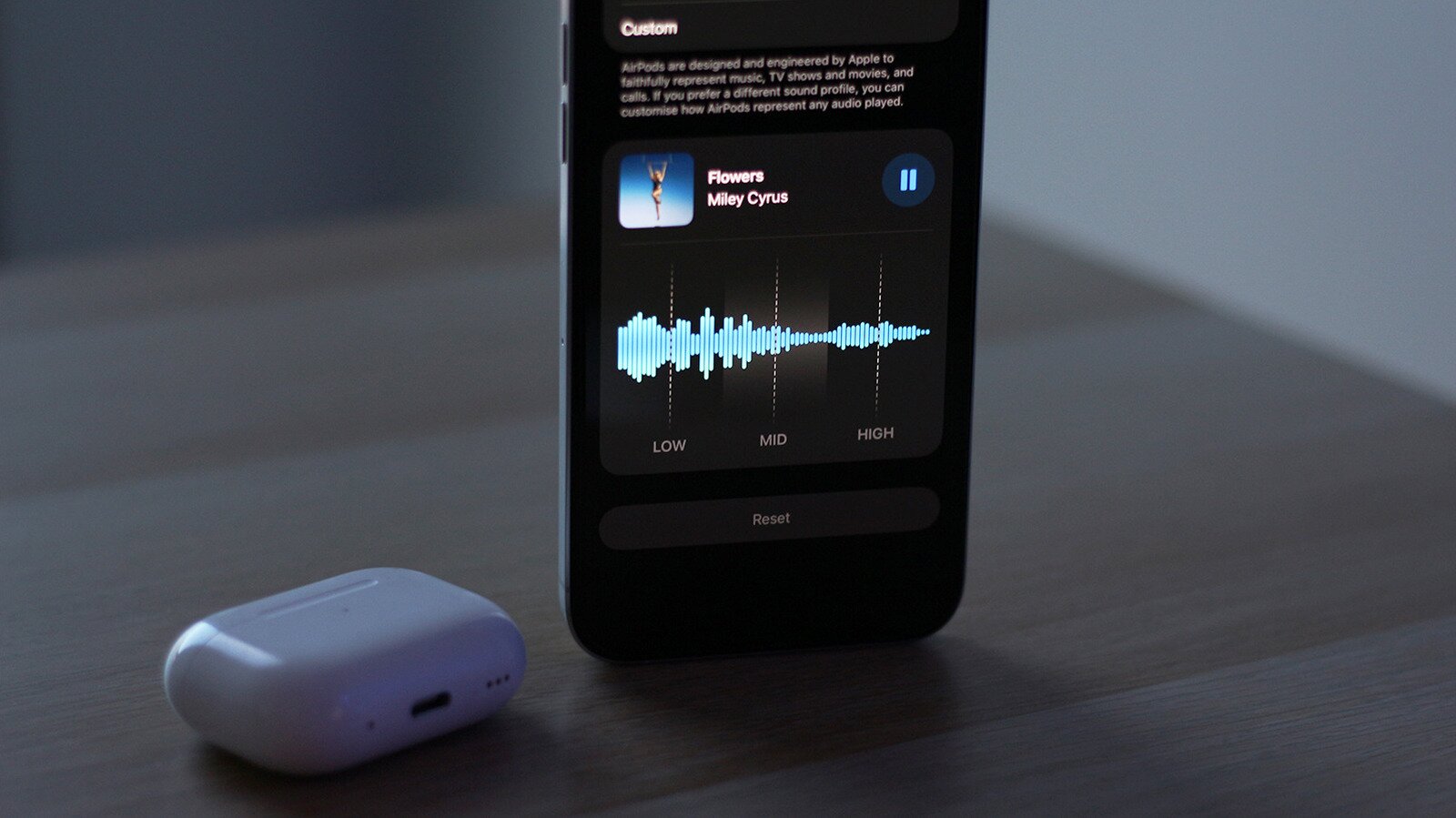
You can finally adjust how your AirPods sound.
Adnan Ahmed for Engadget If you use an iPhone or Mac on a daily basis and need to get your wireless audio needs taken care of, a set of Apple's AirPods is your best bet. You even have a few different options, so it's not like they're reserved for those willing to spend hundreds of dollars on a pair of headphones or earbuds. With features like active noise cancellation, spatial audio and solid battery life, the AirPods 4 with ANC offer many of the same perks as the more expensive AirPods Pro 3 do. Plus, Apple has tweaked the listening experience in a way that attracts most casual listeners.
With iOS 27, though, Apple is giving users more control over how their AirPods sound. Beta builds of iOS 27 offer a new custom EQ feature that lets you adjust different frequencies to emphasize the vocals or bring out more bass. You'll need an iPhone, iPad, or Mac running the latest beta software from Apple and a pair of compatible AirPods also running the newest beta firmware. Apple hasn't explicitly mentioned which AirPod models are set to receive the custom EQ treatment, but reports suggest that the feature is currently available on newer models equipped with Apple's H2 chip. This includes AirPods Pro 2, AirPods Pro 3, AirPods 4 and the AirPods Max 2.
To get started, connect your AirPods to your iPhone, iPad or Mac. Open the Settings app and head to your AirPods' settings page. Navigate to Audio & Routing > Equalizer . If you don't spot this submenu, head back, scroll down, tap on AirPods Beta Updates and turn the toggle on. Firmware updates are automatically installed when you place the AirPods in their charging case and place it near the connected device.
Adnan Ahmed for Engadget If you've clicked on this article, chances are you've messed around with EQ settings before, which is why Apple's 3-band equalizer for the AirPods may seem a little basic at first — because in usual Apple fashion, it actually is. However, don't let the feature's simplicity fool you into thinking it cannot make a noticeable difference in how your music sounds. By default, the AirPods equalizer is set to "Recommended," which, depending on your AirPods model, can sound quite different. For instance, the AirPods Pro 3 push deeper bass and fuller sound compared to the AirPods 4, which lack a proper in-ear seal.
When you switch over to the "Custom" profile, the equalizer lets you adjust three frequency ranges — lows, mids and highs. The low frequency range is where you would describe feeling a lot of the music rather than just hearing it. Bass instruments and kick drums sit largely in this range. The mids cover most of the instruments and vocals you hear in a track, while the highs are responsible for brighter sounds and finer details like hi-hats, cymbals and the upper vocal range.
The 3-band equalizer that iOS 27 provides gives you less control than a traditional multi-band EQ, but it does help the average consumer find a sound they like without requiring a lot of knowledge about what the different frequencies represent. Personally, I'm a basshead, and I found the AirPods EQ to be surprisingly effective at adding extra punch to the low end.
Adnan Ahmed for Engadget Finding the right EQ settings doesn't have to be a challenge, which is why I understand Apple's approach of keeping things simple. The best way to make the most out of this feature is to fire up a track you like, launch the AirPods EQ settings and play around with each slider while listening for the differences. Some prefer having the bass (low frequency) cranked all the way up, while others would rather boost the mids or highs to make the vocals and other instruments stand out with more clarity. If you do mess up, there's a handy Reset button that brings all three bands to a flat EQ.
There's one thing to note here, though. These EQ adjustments for your AirPods are separate from EQ settings available inside Apple Music. If that happens to be your preferred music streaming service , navigate to Settings > Apps > Music > EQ, and make sure you turn it off if you don't want to apply two different EQ adjustments at the same time. Also check to see if you have any other audio effects applied by heading to Settings > Accessibility > Audio & Visual > Headphone Accommodations.
Changes you make to your AirPods' EQ are saved to the AirPods themselves. This means they will use the same audio profile regardless of which device you pair them to. This was a welcome addition I didn't expect — being able to enjoy skull-crushing bass when I'm connected to my Android phone makes the feature considerably more effective for me. In addition to iOS 27, you can change these EQ settings at any time on a connected Mac by launching System Settings or an iPad through the Settings app .
Indexed and credited by AIPROPX. Originating outlet: Engadget. Open at source →
An original, deterministic readout — composed only from the computed coverage facts on this page. No interpretation, no rating; figures only.
AIPROPX has consolidated 1 report from 1 outlet into a single canonical entry on “How to adjust the custom EQ settings for your AirPods in iOS 27.” Every covered outlet is based in Other.
The only timestamped report came from Engadget (Aug 27, 2026, 18:30 UTC).
1 statement is carried by only one outlet within this set and is not echoed by the others.
Every figure above is a direct count of real published articles. AIPROPX indexes and compares the original reporting — it never rewrites, rates, or editorializes — and each publisher’s full article is always one click away.
Generated by AIPROPX from the source counts above. AIPROPX indexes and resolves coverage; the original publishers are credited and linked at origin in every report.
Coverage from 1 independent outlet across 1 region — each view opens on its own page.
AIPROPX — “How to adjust the custom EQ settings for your AirPods in iOS 27” · https://www.aipropx.com/story/1f6fd7219338520b4e8296a68555fb77
Other events being covered across multiple sources right now.
How to See the Partial Lunar Eclipse and Blood Moon on August 27
5 outletsHow will stocks perform when the Fed chair speaks at Jackson Hole? Here’s what history tells us.
4 outletsHow to watch Apple’s September event: iPhone 18 Pro, iPhone Ultra, more
4 outletsHow Darline Graham’s Politics Compare With Her Brother’s as She Runs for Senate
3 outletsWill plug-in solar panels affect your home insurance? An expert explains what you should know before fitting them
3 outletsHow Much Money Do You Need to Retire?